
Skip to content
05Mobile Development · 2025

Selada

Summary

Selada is a loyalty and shopping app that serves four retail brands, Hokky, GrandLucky, Brastagi and Eraspace, from one codebase, live on Google Play. As a developer at OMNI IT Consulting I was assigned the app in 2023, when it was still Hokky's, and was responsible for it for three years: I carried out its rebrand to Selada and built every app-side path for moving its members onto Eraspace accounts.

Role
Mobile developer · Angular / Ionic
Main developer, at OMNI IT Consulting
Timeline
Sep 2023 – Sep 2026
On an app running since 2019
Client
Four retail brands
Hokky · GrandLucky · Brastagi · Eraspace
Stack
Angular · Ionic
Capacitor · TypeScript
Stack
  • TypeScript
  • Angular
  • Ionic
  • Capacitor
  • OneSignal
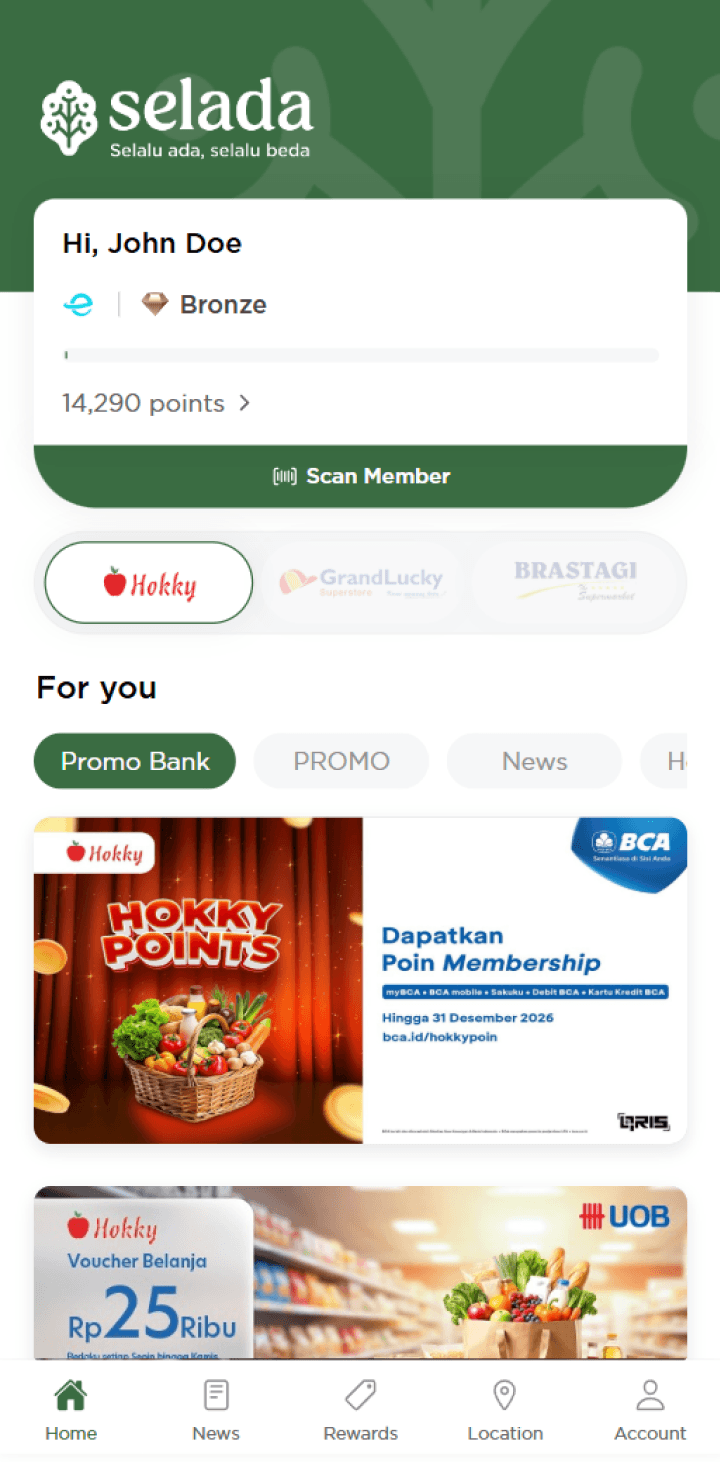
The member card with points, tier and the scan barcode, above a switcher for each brand.
(01)

The problem

I inherited a live loyalty app from 2019 that had to become a four-brand app and move its members onto a second account system, without stopping it shipping.

The codebase predated me by four years: an old Capacitor version with broken dependencies, the brand hard-coded into it, and tabs that loaded slowly because each request waited for the one before it, nested inside the page's start-up code.

Then two big changes landed on top of it. The app had to serve four brands under one name, Selada, and it had to work with two account systems at once, the old membership API and Eraspace's, while members moved from one to the other. The backends matched and moved the accounts; the app had to handle every state a member could be in, and keep its own state in step with both systems.

  • A platform upgrade: Capacitor 3, then 5, and Android SDK 36, to keep publishing on Google Play
  • One codebase for four brands, with the brand as data rather than a build
  • Faster tabs, with independent requests running in parallel
  • The old membership API and the Eraspace APIs working side by side
  • A client path for every migration state, including members who decline
  • Fewer stuck screens: error handling, loading states, and a required-update screen
(02)

How I solved it

I was assigned an app that had been running since 2019 and was responsible for it for three years: first a platform upgrade (Capacitor 3, later 5, and Android SDK 36), then features such as biometric login, nearest-store location and prize draws, the rebrand, and the migration. Three decisions shaped it.

01One HTTP layer for two backends

The app talks to two backends, the old Hokky API and Eraspace's, and every request goes through one interceptor, so failures are handled the same way everywhere instead of page by page. Server errors (5xx) are retried up to three times, a second apart, because they're often temporary. Client errors (4xx) are never retried: sending a wrong password again won't make it right. An expired session (a 401, or Eraspace's 422) logs the member out at once, and the error message appears only after the retries run out, so members don't see a failure a retry would have fixed.

The interceptor also had a quiet bug. Its error handler was an async function, and RxJS treats a function that returns a Promise as a new stream, so the error was delivered to the caller as if it were data. Pages received an error response where they expected a result. I made the handler synchronous and left a comment explaining why it must stay that way. The same day I fixed its sibling: the forced logout threw a plain error that replaced the real HTTP response, so pages crashed reading its message and the "don't retry client errors" check lost the status code.

src/app/providers/interceptor/interceptor.module.tsTypeScript
retryWhen(errors =>  errors.pipe(    scan((retryCount, err: HttpErrorResponse) => {      // skip retry on client errors      if (err.status < 500) {        throw err;      }      // stop retrying after 3 attempts      if (retryCount >= MAX_RETRY) {        throw err;      }      return retryCount + 1;    }, 0),    delay(1000),  ),),
Trade-off

A request that keeps failing takes a few seconds longer to report its error.
02Screen brightness that comes back, on Android and iOS

Showing the member barcode raises the screen to full brightness so the cashier's scanner can read it. Putting it back afterwards never worked. The native plugin returns the brightness as a string, not a number, on both Android and iOS, so the check for a number always failed and the restore never ran.

"Put it back" also means different things per platform. On Android, -1 hands brightness back to the system; on iOS the value is always between 0 and 1, and sending -1 turns the screen black. I moved the logic out of the two barcode pages into one service: it reads and parses the original value before boosting, restores exactly that, and if the original couldn't be read, falls back to the system setting on Android and leaves iOS untouched rather than risk a black screen.

src/app/services/screen-brightness.service.tsTypeScript
// the native plugin returns a string ("-1.0" on Android, "0.483000" on iOS)private async read(): Promise<number | null> {  const raw: any = await this.brightness.getBrightness();  const value = typeof raw === 'number' ? raw : parseFloat(raw);  return Number.isFinite(value) ? value : null;} // fallback if the original couldn't be read: -1 means "system" on Android,// but on iOS it means a black screen, so leave iOS aloneprivate systemDefault(): number | null {  return this.platform.is('ios') ? null : -1;}
Trade-off

One more shared service to inject, instead of a few lines in each page

03Home data kept per brand

The home tab shows one brand at a time, and switching between the four brands used to load everything again. I rewrote its loading so each piece, news categories, news, highlight ads, guides, member data and recent transactions, has its own named fetch method that takes the brand ID. Each method first looks for that brand's data already loaded on the page and only calls the API if it isn't there, so switching back to a brand shows it straight away. Pulling down to refresh clears that brand's data and loads it fresh.

I refactored the other tabs, news, rewards, location and profile, the same way, replacing nested subscriptions in one long start-up handler with named fetches that are easier to read and change.

Trade-off

Data kept on the page can be older than the server's until the member pulls to refresh.

(03)

Results

owning an app that started in 2019`
3 years
retail brands in one app
4
backends behind one HTTP layer
2

Selada is live on Google Play, serving members of Hokky, GrandLucky, Brastagi and Eraspace from one app. Over three years I kept a 2019 codebase shippable through the Capacitor upgrades and Android SDK 36, carried it through the rebrand, built every app-side path for the move onto Eraspace accounts, and made it more dependable along the way: one error policy for both backends, a barcode screen that restores brightness on both platforms, and a home tab that doesn't reload on every brand switch.

(04)

Screens

News and promotions by category, for the brand selected at the top.
Eraspace points, spent on rewards from the selected brand.
Each brand's stores, with call and WhatsApp buttons.
Progress to the next tier, and what each tier earns.

Next project06 / 06

Faris Azhar Portfolio Website

Got something in mind?

Let's build the next one.